Overview
This blog demonstrates DreamingFish’s expertise in AI animation and AI avatar creation. By leveraging various AI animation platforms and tools, we successfully delivered a complex project involving character animation, lip-syncing, and seamless integration of different AI-generated video segments. Our iterative approach and (now) deep understanding of AI animation software allowed us to overcome challenges and achieve high-quality results for our client. This project highlights the evolving capabilities of AI animation technology and our commitment to staying at the forefront of this rapidly advancing field.
The client and the brief
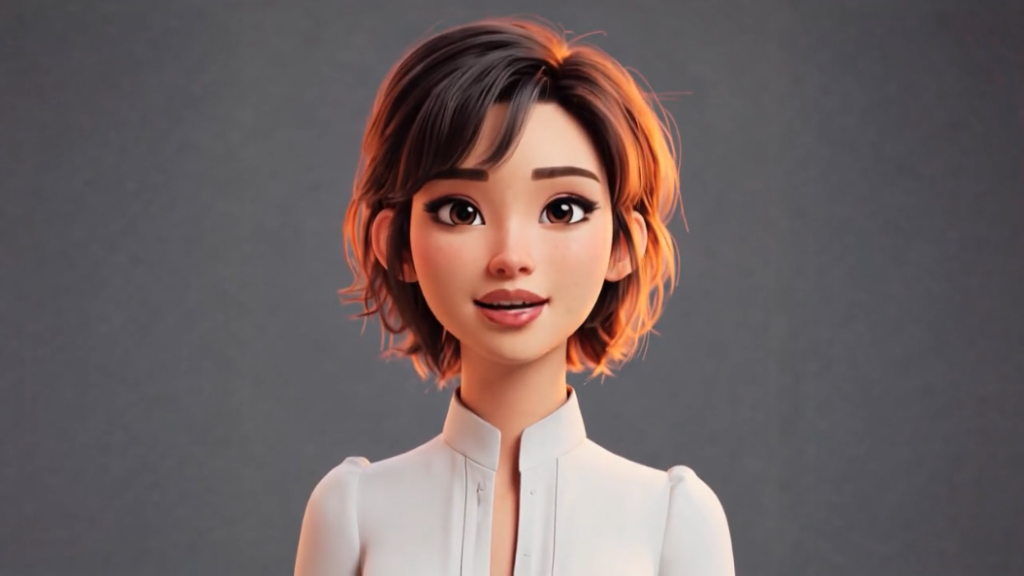
A real estate company approached us with a vision: a virtual assistant that could act as the face of their office tech. Starting with a character from Muse AI/Skiv, we took the lead on the animation phase, bringing the avatar to life so it could effectively train their AI engine and engage with their clients in real time.
The character
In order to train the software that would create the avatar, we need to create a two-minute animation of the character, both idling (silent) and speaking. Our first thought was to remodel the character in Cinema 4D, and that would then allow us to manipulate the character however we wanted. However, budget and time wouldn’t allow this, so we chose to use AI to animate the character instead.
AI character animation
DreamingFish has experience in creating and animating characters, but we are still (as is everyone!) relatively new to the world of AI animation. This is now possible as the platforms have progressed massively over the last year. We took the still image of the character, which was provided in a 9:16 format, and used Firefly, Adobe’s AI tool, to create the character in a 16:9 format and remove the background, replacing it with black. We experimented with animating the character within HeyGen Studio, a platform which was created to create and run AI avatars, but we found that the software wasn’t reliable, even though it was great at lip-syncing. It seemed impossible to get the character to idle without talking!
Instead, we took the still image into Runway. Runway was great at animating the character in a realistic way, and we used this to create the idling sections that were needed at the start and end of the video. We also tested Kling and Veo3, but found both of these lacking in realistic movement and prompt adherence. It took a number of attempts to get the quality of videos we needed, as there were still some odd things that the character did, and we learned a lot about how to prompt for exactly what we were looking for.


Lip-synching an animated AI character
Once we had our silent sections, we also needed to create 90 seconds of the character speaking. First, we needed a script. With messages supplied by the client, we ran them through Claude to create a 90-second script. Next, we generated the voiceover using the client’s preferred AI voice on ElevenLabs, an AI voiceover platform.
We initially tried HeyGen with this script, but it didn’t produce the quality that we were looking for. As Runway can’t lip-sync (yet!) we did some research and tried Hedra. Hedra is purely for creating talking heads. While it is not useful for animation per se, it is great at lip-syncing a character to a script. Using the audio we’d generated from ElevenLabs, and the final frame of the video we’d created of the character idling, we generated 90 seconds of lip-synced animation. This then fit seamlessly into the middle video between the two idling sequences.
Final delivery
We did some post-production grading on the videos, as the different platforms looked slightly different, but otherwise the workflow worked really well. We generated the 2 minutes of video needed and supplied this to our very happy client. Check out the test animation version of Amelia below:👇🏼🎥
**Note: It’s worth saying that all the AI video platforms are constantly changing and updating, and what might not have been possible a month ago may be possible today. Other platforms are constantly springing up too, and other AI tools are now offering video support. Some of the platforms used here are subscription-based, and we needed to subscribe to be able to access the volume of regenerations needed to get the videos exactly as we wanted them.